

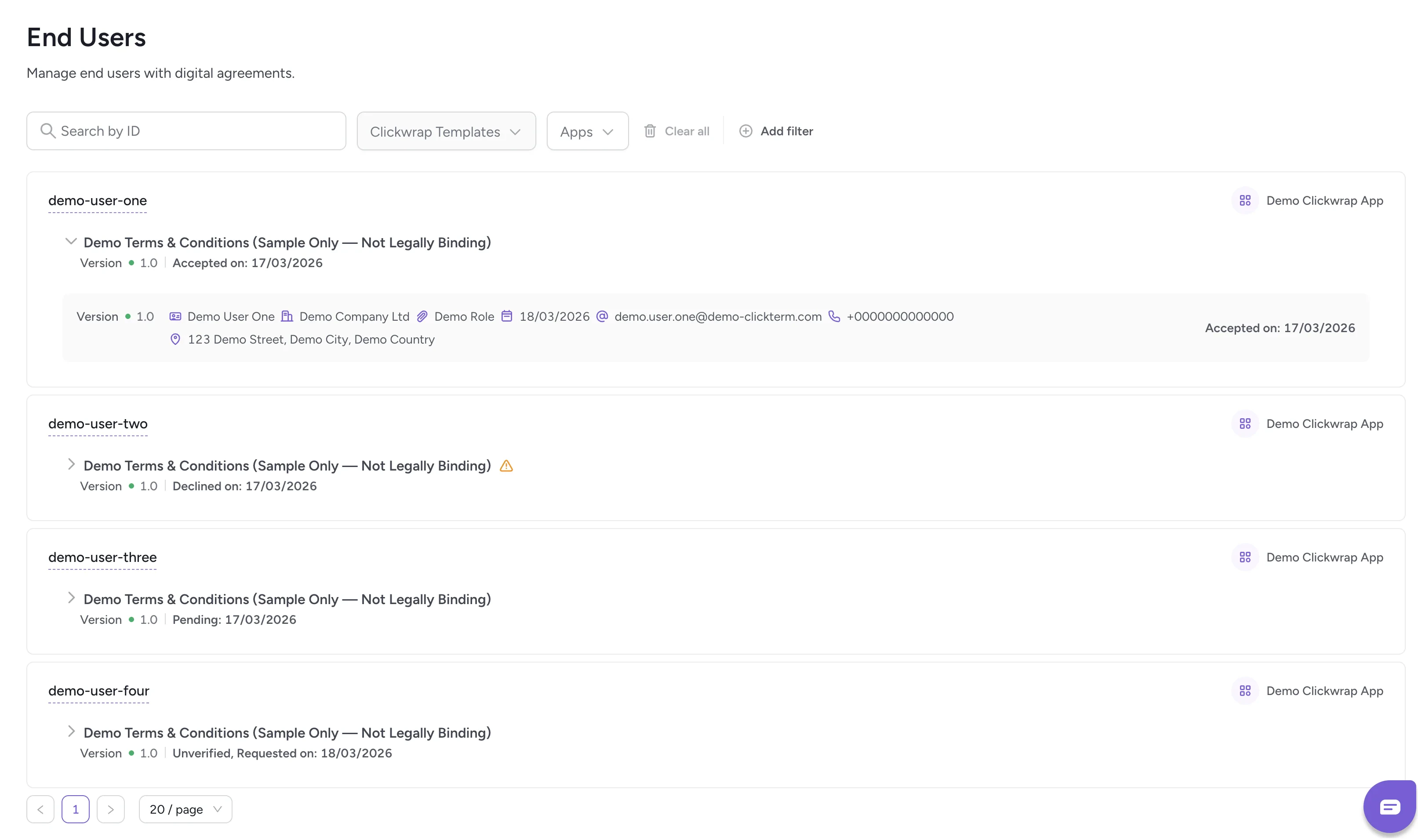
The End Users page displays all users who have interacted with your digital agreements through ClickTerm. Each entry represents a single end user, along with their acceptance history, template versions, and metadata provided by your integration.
End users page
This page helps you understand which templates an end user has seen, which versions they have interacted with, and whether they have accepted or declined any agreements.

End user cards

End user card
For each end user, the page shows:
  • End User ID
  • Which templates they interacted with
  • Which versions of the document were used
  • Latest event status (e.g., Accepted, Declined)
  • Latest event date
  • The template’s associated app (integration name)
If multiple events are available for the user inside one agreement, the card displays the most recent one. You can expand the list to see all events for that agreement (e.g., accepting previous versions). For each agreement, you can see key information about the user if it was provided by your integration with placeholders (like Full Name, Company Name, Job Title). These values come from placeholders populated in your clickwrap session payload. If your integration does not provide certain fields, they will not be shown.
For developers:
  • Each user corresponds to an endUserId in the API
  • Events shown here match entries from the API (clickwrapEventId)
  • Placeholder values come from your clickwrap session payload
  • Version numbers map directly to the Clickwrap Templates page

Clickwrap events

View detailed event logs and download certificates.

Placeholders

Configure dynamic fields for end user data.
