

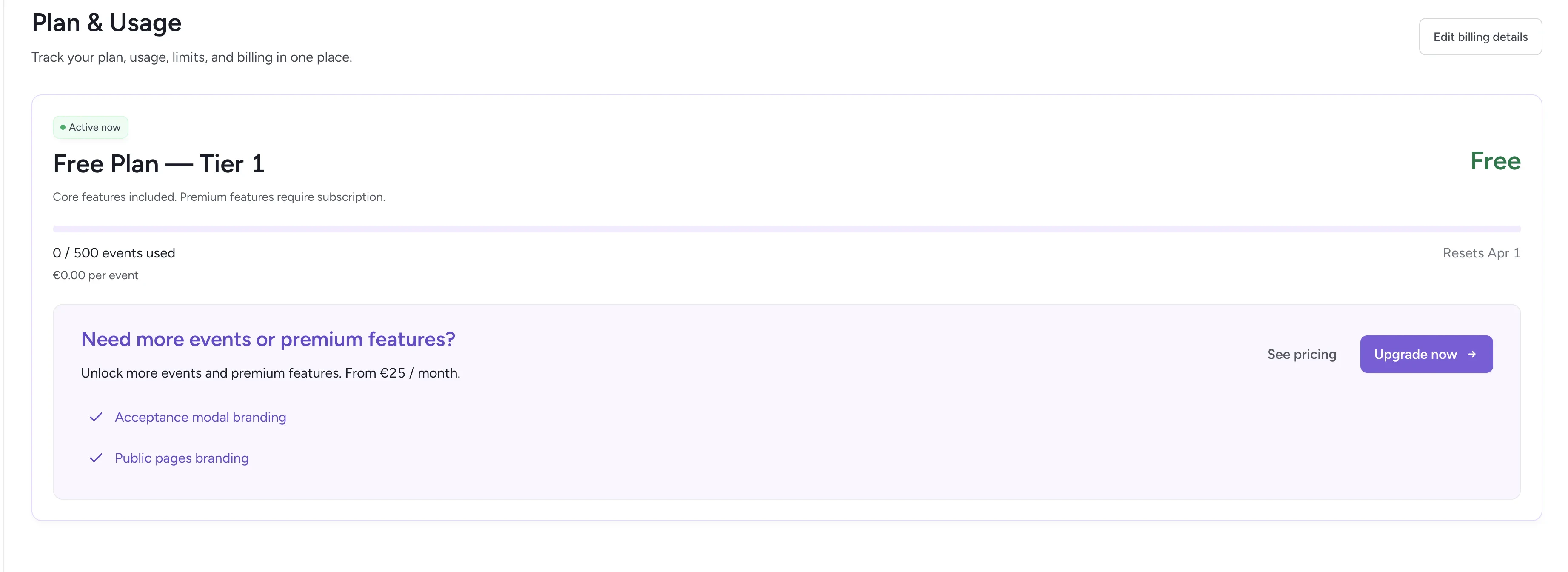
Plan and usage overview
Current tier
Your active plan is displayed at the top. For example:- Tier 1 (default for all new workspaces)
- All core features included
- You only pay for verification events once you exceed the free limit
Usage bar
The usage bar visualizes your monthly consumption, making it clear where you stand relative to your current tier.Usage counters
- Events used — The total number of verification events processed this month
- Total spent — Total cost based on usage above your free tier
No manual upgrade is required — you are automatically billed based on usage.
Billing information
With active subscription:- Next payment date shown (e.g., April 1, 2026)
- Manage payment — Update your payment method or billing details
- Cancel subscription — Stop your recurring subscription
- Upgrade now — Start a Premium subscription
- See pricing — Compare plans and pricing tiers
Related
Billing & invoicing
Manage payment methods and download invoices.
Team management
Control workspace access and member roles.