> ## Documentation Index
> Fetch the complete documentation index at: https://docs.clickterm.com/llms.txt
> Use this file to discover all available pages before exploring further.
# Webhooks
> Receive verified clickwrap events on your backend and validate webhook signatures securely.
**Prerequisites:** A configured integration in the ClickTerm Dashboard, a public HTTPS endpoint in your backend, and a completed [signature verification flow](/dev/guides/verifying-signature).
Use webhooks when you want ClickTerm to notify your backend automatically after a clickwrap event has been verified. This is useful for synchronizing consent data, triggering downstream workflows, or updating internal systems without polling.
## When webhooks are sent
ClickTerm sends a webhook only after your backend successfully calls `POST /public-client/v1/clickwrap/verify` and the clickwrap event is finalized.
Webhooks complement the verification response. Use the direct API response for the
immediate user flow, and use webhooks for asynchronous backend processing.
## Flow overview
```mermaid theme={null}
sequenceDiagram
participant Frontend
participant Your Backend
participant ClickTerm API
participant Webhook Endpoint
Frontend->>Your Backend: Submit ClickTerm signature
Your Backend->>ClickTerm API: POST /clickwrap/verify
ClickTerm API-->>Your Backend: Verified event metadata
ClickTerm API->>Webhook Endpoint: POST webhook payload
Webhook Endpoint-->>ClickTerm API: 200 OK
```
## Setup
Open your [integration](https://app.clickterm.com/integrations) in the ClickTerm Dashboard and set a public HTTPS webhook URL for your backend.
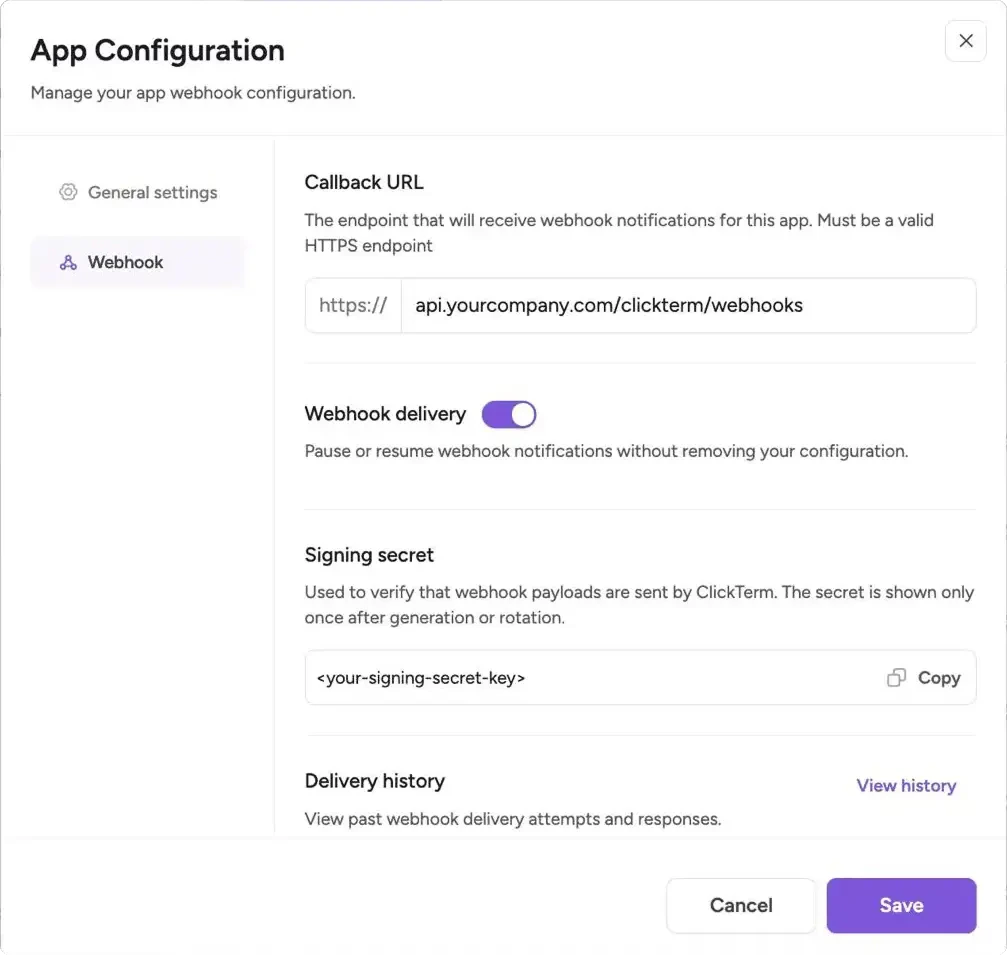 The URL must use HTTPS and resolve to a public IP address. Localhost, private
networks (e.g. `10.x.x.x`, `172.16.x.x`, `192.168.x.x`), and cloud metadata
endpoints are rejected.
Save the webhook signing secret in your backend secret manager or environment configuration.
Your endpoint must accept HTTP `POST` requests and preserve the raw request body for signature verification.
Validate the timestamp and `X-Clickterm-Signature` header before parsing or acting on the payload.
Respond with `200 OK` only after successful verification and processing. Any other response is treated as a failed delivery.
## Request format
Webhook callbacks are sent as HTTP `POST` requests with `Content-Type: application/json`.
### Headers
| Header | Format | Description |
| ----------------------- | --------------------- | ----------------------------------------------------- |
| `Content-Type` | `application/json` | Always `application/json` |
| `X-Clickterm-Signature` | `sha256={hex_digest}` | HMAC SHA-256 signature prefixed with `sha256=` |
| `X-Clickterm-Timestamp` | `1711800000` | Unix timestamp in seconds used in the signing payload |
### Example raw request
```http theme={null}
POST /webhooks/clickterm HTTP/1.1
Content-Type: application/json
X-Clickterm-Timestamp: 1711800000
X-Clickterm-Signature: sha256=3f2b8a1c9d4e5f6a7b8c9d0e1f2a3b4c5d6e7f8a9b0c1d2e3f4a5b6c7d8e9f0
{"eventType":"CLICKWRAP_EVENT_VERIFIED","data":{...}}
```
The `X-Clickterm-Signature` header always starts with the `sha256=` prefix followed by
the hex-encoded HMAC digest. When verifying, you must either strip this prefix before
comparing or prepend it to your computed digest. Comparing the raw header value directly
against the hex digest alone will always fail.
### Payload
```json theme={null}
{
"eventType": "CLICKWRAP_EVENT_VERIFIED",
"data": {
"clickwrapEventId": "2d6cfb0f-88f0-44be-9642-68f5244a1c3d",
"clickwrapTemplateId": "f13d7494-45ea-498f-a1a8-f7cbdf8f5fe0",
"clickwrapTemplateVersion": 3,
"clickwrapTemplateVersionMinor": 1,
"endUserId": "external-user-12345",
"templatePlaceholders": "{\"fullName\":\"TestUser\"}",
"technicalMetadata": "{\"userAgent\":\"Mozilla/5.0\",\"ip\":\"203.0.113.42\"}",
"actionAt": "2026-03-23T14:30:00Z",
"effectiveAt": "2026-03-23T14:00:00Z",
"clickwrapEventStatus": "ACCEPTED"
}
}
```
`templatePlaceholders` and `technicalMetadata` are JSON-encoded strings, not objects.
Parse them in your handler (e.g. `JSON.parse(data.templatePlaceholders)` in JavaScript,
`json.loads(data["templatePlaceholders"])` in Python).
### Payload fields
| Field | Type | Description |
| ----------- | ------ | --------------------------------------------------- |
| `eventType` | String | Event identifier |
| `data` | Object | Event payload. The structure depends on `eventType` |
## Event types
Currently supported webhook event types:
| Event Type | Description |
| -------------------------- | ------------------------------------------------------------------------ |
| `CLICKWRAP_EVENT_VERIFIED` | Sent when a clickwrap event has been successfully verified and finalized |
### `CLICKWRAP_EVENT_VERIFIED` payload
| Field | Type | Description |
| ------------------------------- | ------------------------- | ----------------------------------------------------------------------- |
| `clickwrapEventId` | UUID | Unique identifier of the clickwrap event |
| `clickwrapTemplateId` | UUID | Unique identifier of the clickwrap template |
| `clickwrapTemplateVersion` | Integer | Major version of the template associated with the event |
| `clickwrapTemplateVersionMinor` | Integer | Minor version of the template associated with the event |
| `endUserId` | String | Your end-user identifier provided during verification |
| `templatePlaceholders` | String | JSON-encoded placeholder values provided during verification, or `null` |
| `technicalMetadata` | String | JSON-encoded technical metadata such as IP address and user agent |
| `actionAt` | Timestamp (UTC, ISO-8601) | When the end user accepted or declined |
| `effectiveAt` | Timestamp (UTC, ISO-8601) | When the template version became effective |
| `clickwrapEventStatus` | String | Final verified status, such as `ACCEPTED` or `DECLINED` |
## Delivery behavior
ClickTerm considers a delivery successful only when your endpoint returns `200 OK`.
| Setting | Description |
| ----------------- | ----------------------------------------------------------------------------- |
| Success condition | Your endpoint returns `200 OK` after verification and processing |
| Failed delivery | Any non-`200` response, including `201`, `204`, and all `4xx`/`5xx` responses |
| Retry count | Up to 3 retries after the initial failed attempt |
| Retry backoff | Exponential, starting at 60 seconds and increasing up to 300 seconds |
| Request timeout | 10 seconds per delivery attempt |
| Redirects | Not followed — your endpoint must respond directly |
**Only `200 OK` is accepted as a success.** Other `2xx` status codes like `201 Created`
or `204 No Content` are treated as failures and will trigger retries. Make sure your
webhook handler returns exactly `200`.
Webhook handlers should be idempotent. Retries can happen if your endpoint times
out or returns a non-`200` response.
### Recovering missed webhooks
If all delivery attempts fail, the webhook is not retried further. Your event data is still stored in ClickTerm. To diagnose and recover:
* Check the [Delivery history](/product/integrations/integrations-overview#delivery-history) in your integration settings to see request payloads, response status codes, and timestamps for recent delivery attempts
* Use [`GET /clickwraps/{endUserId}/status`](/dev/guides/checking-consent-status) to poll for the current consent state of specific users
* Check the [Clickwrap Events](/product/consent/clickwrap-events) page in the Dashboard for event history, or via the [`GET /clickwrap-events`](/api-reference/events/list-clickwrap-events) API
For production integrations, combine webhooks with periodic status polling.
Use webhooks for real-time event-driven workflows, and use the status endpoint
as a fallback to catch any events that weren't delivered successfully.
## Verify webhook signatures
To verify a webhook:
Concatenate the `X-Clickterm-Timestamp` header, a literal dot (`.`), and the raw request body:
```text theme={null}
{timestamp}.{rawRequestBody}
```
Calculate the HMAC SHA-256 digest of the signing payload using your webhook signing secret as the key, then hex-encode the result.
Prepend `sha256=` to your computed hex digest to form the expected signature:
```text theme={null}
sha256={hex_digest}
```
Compare your expected signature against the `X-Clickterm-Signature` header value using a constant-time comparison function to prevent timing attacks.
```java example.java (Spring Boot) theme={null}
@RestController
@RequestMapping("/webhooks/clickterm")
public class ClickTermWebhookController {
private static final String TIMESTAMP_HEADER = "X-Clickterm-Timestamp";
private static final String SIGNATURE_HEADER = "X-Clickterm-Signature";
private static final long MAX_SKEW_SECONDS = 300L;
@Value("${clickterm.webhook-secret}")
private String webhookSecret;
@PostMapping
public ResponseEntity receiveWebhook(
@RequestHeader(TIMESTAMP_HEADER) String timestamp,
@RequestHeader(SIGNATURE_HEADER) String signature,
@RequestBody byte[] rawBody
) throws Exception {
long now = Instant.now().getEpochSecond();
long requestTs = Long.parseLong(timestamp);
if (Math.abs(now - requestTs) > MAX_SKEW_SECONDS) {
return ResponseEntity.status(HttpStatus.UNAUTHORIZED).build();
}
String signedPayload = timestamp + "." + new String(rawBody, StandardCharsets.UTF_8);
Mac mac = Mac.getInstance("HmacSHA256");
mac.init(new SecretKeySpec(
webhookSecret.getBytes(StandardCharsets.UTF_8),
"HmacSHA256"
));
String digest = HexFormat.of().formatHex(
mac.doFinal(signedPayload.getBytes(StandardCharsets.UTF_8))
);
// Important: prepend "sha256=" to match the header format
String expected = "sha256=" + digest;
if (!MessageDigest.isEqual(
signature.getBytes(StandardCharsets.UTF_8),
expected.getBytes(StandardCharsets.UTF_8)
)) {
return ResponseEntity.status(HttpStatus.UNAUTHORIZED).build();
}
// Parse rawBody and process the event here.
return ResponseEntity.ok().build();
}
}
```
```javascript example.js (Express) theme={null}
import crypto from "node:crypto";
import express from "express";
const app = express();
app.use(
express.json({
verify: (req, _res, buf) => {
req.rawBody = buf;
},
})
);
const TIMESTAMP_HEADER = "X-Clickterm-Timestamp";
const SIGNATURE_HEADER = "X-Clickterm-Signature";
const MAX_SKEW_SECONDS = 300;
app.post("/webhooks/clickterm", (req, res) => {
const secret = process.env.CLICKTERM_WEBHOOK_SECRET;
const timestamp = req.header(TIMESTAMP_HEADER);
const signature = req.header(SIGNATURE_HEADER);
if (!secret || !timestamp || !signature) {
return res.sendStatus(400);
}
const now = Math.floor(Date.now() / 1000);
if (Math.abs(now - Number(timestamp)) > MAX_SKEW_SECONDS) {
return res.sendStatus(401);
}
const signingPayload = Buffer.concat([
Buffer.from(`${timestamp}.`, "utf8"),
req.rawBody ?? Buffer.from("", "utf8"),
]);
const digest = crypto
.createHmac("sha256", secret)
.update(signingPayload)
.digest("hex");
// Important: prepend "sha256=" to match the header format
const expected = `sha256=${digest}`;
const isValid =
signature.length === expected.length &&
crypto.timingSafeEqual(Buffer.from(signature), Buffer.from(expected));
if (!isValid) {
return res.sendStatus(401);
}
const { eventType, data } = req.body;
if (eventType === "CLICKWRAP_EVENT_VERIFIED") {
// Process the verified clickwrap event here.
console.log(data.clickwrapEventId, data.clickwrapEventStatus);
}
return res.sendStatus(200);
});
```
```python example.py (Flask) theme={null}
import hashlib
import hmac
import os
import time
from flask import Flask, jsonify, request
app = Flask(__name__)
TIMESTAMP_HEADER = "X-Clickterm-Timestamp"
SIGNATURE_HEADER = "X-Clickterm-Signature"
MAX_SKEW_SECONDS = 300
@app.post("/webhooks/clickterm")
def clickterm_webhook():
secret = os.environ.get("CLICKTERM_WEBHOOK_SECRET")
timestamp = request.headers.get(TIMESTAMP_HEADER)
signature = request.headers.get(SIGNATURE_HEADER)
if not secret or not timestamp or not signature:
return ("", 400)
if abs(int(time.time()) - int(timestamp)) > MAX_SKEW_SECONDS:
return ("", 401)
raw_body = request.get_data()
signed_payload = timestamp.encode("utf-8") + b"." + raw_body
digest = hmac.new(
secret.encode("utf-8"),
signed_payload,
hashlib.sha256,
).hexdigest()
# Important: prepend "sha256=" to match the header format
expected = f"sha256={digest}"
if not hmac.compare_digest(signature, expected):
return ("", 401)
payload = request.get_json()
if payload["eventType"] == "CLICKWRAP_EVENT_VERIFIED":
data = payload["data"]
print(data["clickwrapEventId"], data["clickwrapEventStatus"])
return jsonify({"received": True}), 200
```
## Best practices
* Use the raw request body for signature verification. Do not reserialize JSON before computing the HMAC.
* Reject stale timestamps to reduce replay risk.
* Store webhook secrets in a secret manager or environment variables, not in source control.
* Make event processing idempotent by keying on `clickwrapEventId`.
* Return `200 OK` quickly, and offload slow downstream work to a queue if needed.
## Related
Verify the ClickTerm signature before the webhook is generated.
Query consent state directly for specific end users.
Reference for the clickwrap events listing endpoint.
The URL must use HTTPS and resolve to a public IP address. Localhost, private
networks (e.g. `10.x.x.x`, `172.16.x.x`, `192.168.x.x`), and cloud metadata
endpoints are rejected.
Save the webhook signing secret in your backend secret manager or environment configuration.
Your endpoint must accept HTTP `POST` requests and preserve the raw request body for signature verification.
Validate the timestamp and `X-Clickterm-Signature` header before parsing or acting on the payload.
Respond with `200 OK` only after successful verification and processing. Any other response is treated as a failed delivery.
## Request format
Webhook callbacks are sent as HTTP `POST` requests with `Content-Type: application/json`.
### Headers
| Header | Format | Description |
| ----------------------- | --------------------- | ----------------------------------------------------- |
| `Content-Type` | `application/json` | Always `application/json` |
| `X-Clickterm-Signature` | `sha256={hex_digest}` | HMAC SHA-256 signature prefixed with `sha256=` |
| `X-Clickterm-Timestamp` | `1711800000` | Unix timestamp in seconds used in the signing payload |
### Example raw request
```http theme={null}
POST /webhooks/clickterm HTTP/1.1
Content-Type: application/json
X-Clickterm-Timestamp: 1711800000
X-Clickterm-Signature: sha256=3f2b8a1c9d4e5f6a7b8c9d0e1f2a3b4c5d6e7f8a9b0c1d2e3f4a5b6c7d8e9f0
{"eventType":"CLICKWRAP_EVENT_VERIFIED","data":{...}}
```
The `X-Clickterm-Signature` header always starts with the `sha256=` prefix followed by
the hex-encoded HMAC digest. When verifying, you must either strip this prefix before
comparing or prepend it to your computed digest. Comparing the raw header value directly
against the hex digest alone will always fail.
### Payload
```json theme={null}
{
"eventType": "CLICKWRAP_EVENT_VERIFIED",
"data": {
"clickwrapEventId": "2d6cfb0f-88f0-44be-9642-68f5244a1c3d",
"clickwrapTemplateId": "f13d7494-45ea-498f-a1a8-f7cbdf8f5fe0",
"clickwrapTemplateVersion": 3,
"clickwrapTemplateVersionMinor": 1,
"endUserId": "external-user-12345",
"templatePlaceholders": "{\"fullName\":\"TestUser\"}",
"technicalMetadata": "{\"userAgent\":\"Mozilla/5.0\",\"ip\":\"203.0.113.42\"}",
"actionAt": "2026-03-23T14:30:00Z",
"effectiveAt": "2026-03-23T14:00:00Z",
"clickwrapEventStatus": "ACCEPTED"
}
}
```
`templatePlaceholders` and `technicalMetadata` are JSON-encoded strings, not objects.
Parse them in your handler (e.g. `JSON.parse(data.templatePlaceholders)` in JavaScript,
`json.loads(data["templatePlaceholders"])` in Python).
### Payload fields
| Field | Type | Description |
| ----------- | ------ | --------------------------------------------------- |
| `eventType` | String | Event identifier |
| `data` | Object | Event payload. The structure depends on `eventType` |
## Event types
Currently supported webhook event types:
| Event Type | Description |
| -------------------------- | ------------------------------------------------------------------------ |
| `CLICKWRAP_EVENT_VERIFIED` | Sent when a clickwrap event has been successfully verified and finalized |
### `CLICKWRAP_EVENT_VERIFIED` payload
| Field | Type | Description |
| ------------------------------- | ------------------------- | ----------------------------------------------------------------------- |
| `clickwrapEventId` | UUID | Unique identifier of the clickwrap event |
| `clickwrapTemplateId` | UUID | Unique identifier of the clickwrap template |
| `clickwrapTemplateVersion` | Integer | Major version of the template associated with the event |
| `clickwrapTemplateVersionMinor` | Integer | Minor version of the template associated with the event |
| `endUserId` | String | Your end-user identifier provided during verification |
| `templatePlaceholders` | String | JSON-encoded placeholder values provided during verification, or `null` |
| `technicalMetadata` | String | JSON-encoded technical metadata such as IP address and user agent |
| `actionAt` | Timestamp (UTC, ISO-8601) | When the end user accepted or declined |
| `effectiveAt` | Timestamp (UTC, ISO-8601) | When the template version became effective |
| `clickwrapEventStatus` | String | Final verified status, such as `ACCEPTED` or `DECLINED` |
## Delivery behavior
ClickTerm considers a delivery successful only when your endpoint returns `200 OK`.
| Setting | Description |
| ----------------- | ----------------------------------------------------------------------------- |
| Success condition | Your endpoint returns `200 OK` after verification and processing |
| Failed delivery | Any non-`200` response, including `201`, `204`, and all `4xx`/`5xx` responses |
| Retry count | Up to 3 retries after the initial failed attempt |
| Retry backoff | Exponential, starting at 60 seconds and increasing up to 300 seconds |
| Request timeout | 10 seconds per delivery attempt |
| Redirects | Not followed — your endpoint must respond directly |
**Only `200 OK` is accepted as a success.** Other `2xx` status codes like `201 Created`
or `204 No Content` are treated as failures and will trigger retries. Make sure your
webhook handler returns exactly `200`.
Webhook handlers should be idempotent. Retries can happen if your endpoint times
out or returns a non-`200` response.
### Recovering missed webhooks
If all delivery attempts fail, the webhook is not retried further. Your event data is still stored in ClickTerm. To diagnose and recover:
* Check the [Delivery history](/product/integrations/integrations-overview#delivery-history) in your integration settings to see request payloads, response status codes, and timestamps for recent delivery attempts
* Use [`GET /clickwraps/{endUserId}/status`](/dev/guides/checking-consent-status) to poll for the current consent state of specific users
* Check the [Clickwrap Events](/product/consent/clickwrap-events) page in the Dashboard for event history, or via the [`GET /clickwrap-events`](/api-reference/events/list-clickwrap-events) API
For production integrations, combine webhooks with periodic status polling.
Use webhooks for real-time event-driven workflows, and use the status endpoint
as a fallback to catch any events that weren't delivered successfully.
## Verify webhook signatures
To verify a webhook:
Concatenate the `X-Clickterm-Timestamp` header, a literal dot (`.`), and the raw request body:
```text theme={null}
{timestamp}.{rawRequestBody}
```
Calculate the HMAC SHA-256 digest of the signing payload using your webhook signing secret as the key, then hex-encode the result.
Prepend `sha256=` to your computed hex digest to form the expected signature:
```text theme={null}
sha256={hex_digest}
```
Compare your expected signature against the `X-Clickterm-Signature` header value using a constant-time comparison function to prevent timing attacks.
```java example.java (Spring Boot) theme={null}
@RestController
@RequestMapping("/webhooks/clickterm")
public class ClickTermWebhookController {
private static final String TIMESTAMP_HEADER = "X-Clickterm-Timestamp";
private static final String SIGNATURE_HEADER = "X-Clickterm-Signature";
private static final long MAX_SKEW_SECONDS = 300L;
@Value("${clickterm.webhook-secret}")
private String webhookSecret;
@PostMapping
public ResponseEntity receiveWebhook(
@RequestHeader(TIMESTAMP_HEADER) String timestamp,
@RequestHeader(SIGNATURE_HEADER) String signature,
@RequestBody byte[] rawBody
) throws Exception {
long now = Instant.now().getEpochSecond();
long requestTs = Long.parseLong(timestamp);
if (Math.abs(now - requestTs) > MAX_SKEW_SECONDS) {
return ResponseEntity.status(HttpStatus.UNAUTHORIZED).build();
}
String signedPayload = timestamp + "." + new String(rawBody, StandardCharsets.UTF_8);
Mac mac = Mac.getInstance("HmacSHA256");
mac.init(new SecretKeySpec(
webhookSecret.getBytes(StandardCharsets.UTF_8),
"HmacSHA256"
));
String digest = HexFormat.of().formatHex(
mac.doFinal(signedPayload.getBytes(StandardCharsets.UTF_8))
);
// Important: prepend "sha256=" to match the header format
String expected = "sha256=" + digest;
if (!MessageDigest.isEqual(
signature.getBytes(StandardCharsets.UTF_8),
expected.getBytes(StandardCharsets.UTF_8)
)) {
return ResponseEntity.status(HttpStatus.UNAUTHORIZED).build();
}
// Parse rawBody and process the event here.
return ResponseEntity.ok().build();
}
}
```
```javascript example.js (Express) theme={null}
import crypto from "node:crypto";
import express from "express";
const app = express();
app.use(
express.json({
verify: (req, _res, buf) => {
req.rawBody = buf;
},
})
);
const TIMESTAMP_HEADER = "X-Clickterm-Timestamp";
const SIGNATURE_HEADER = "X-Clickterm-Signature";
const MAX_SKEW_SECONDS = 300;
app.post("/webhooks/clickterm", (req, res) => {
const secret = process.env.CLICKTERM_WEBHOOK_SECRET;
const timestamp = req.header(TIMESTAMP_HEADER);
const signature = req.header(SIGNATURE_HEADER);
if (!secret || !timestamp || !signature) {
return res.sendStatus(400);
}
const now = Math.floor(Date.now() / 1000);
if (Math.abs(now - Number(timestamp)) > MAX_SKEW_SECONDS) {
return res.sendStatus(401);
}
const signingPayload = Buffer.concat([
Buffer.from(`${timestamp}.`, "utf8"),
req.rawBody ?? Buffer.from("", "utf8"),
]);
const digest = crypto
.createHmac("sha256", secret)
.update(signingPayload)
.digest("hex");
// Important: prepend "sha256=" to match the header format
const expected = `sha256=${digest}`;
const isValid =
signature.length === expected.length &&
crypto.timingSafeEqual(Buffer.from(signature), Buffer.from(expected));
if (!isValid) {
return res.sendStatus(401);
}
const { eventType, data } = req.body;
if (eventType === "CLICKWRAP_EVENT_VERIFIED") {
// Process the verified clickwrap event here.
console.log(data.clickwrapEventId, data.clickwrapEventStatus);
}
return res.sendStatus(200);
});
```
```python example.py (Flask) theme={null}
import hashlib
import hmac
import os
import time
from flask import Flask, jsonify, request
app = Flask(__name__)
TIMESTAMP_HEADER = "X-Clickterm-Timestamp"
SIGNATURE_HEADER = "X-Clickterm-Signature"
MAX_SKEW_SECONDS = 300
@app.post("/webhooks/clickterm")
def clickterm_webhook():
secret = os.environ.get("CLICKTERM_WEBHOOK_SECRET")
timestamp = request.headers.get(TIMESTAMP_HEADER)
signature = request.headers.get(SIGNATURE_HEADER)
if not secret or not timestamp or not signature:
return ("", 400)
if abs(int(time.time()) - int(timestamp)) > MAX_SKEW_SECONDS:
return ("", 401)
raw_body = request.get_data()
signed_payload = timestamp.encode("utf-8") + b"." + raw_body
digest = hmac.new(
secret.encode("utf-8"),
signed_payload,
hashlib.sha256,
).hexdigest()
# Important: prepend "sha256=" to match the header format
expected = f"sha256={digest}"
if not hmac.compare_digest(signature, expected):
return ("", 401)
payload = request.get_json()
if payload["eventType"] == "CLICKWRAP_EVENT_VERIFIED":
data = payload["data"]
print(data["clickwrapEventId"], data["clickwrapEventStatus"])
return jsonify({"received": True}), 200
```
## Best practices
* Use the raw request body for signature verification. Do not reserialize JSON before computing the HMAC.
* Reject stale timestamps to reduce replay risk.
* Store webhook secrets in a secret manager or environment variables, not in source control.
* Make event processing idempotent by keying on `clickwrapEventId`.
* Return `200 OK` quickly, and offload slow downstream work to a queue if needed.
## Related
Verify the ClickTerm signature before the webhook is generated.
Query consent state directly for specific end users.
Reference for the clickwrap events listing endpoint.