> ## Documentation Index
> Fetch the complete documentation index at: https://docs.clickterm.com/llms.txt
> Use this file to discover all available pages before exploring further.
# Showing accepted content
> Re-display the agreement an end user has already accepted, using the ClickTerm SDK.
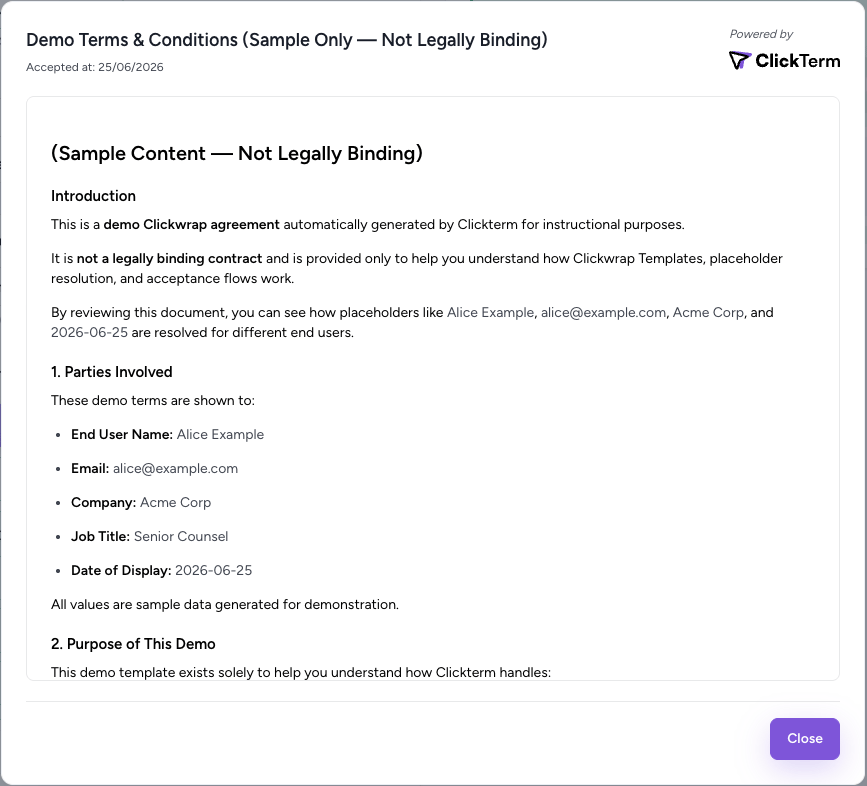
Call `showAcceptedContent` to re-display the agreement an end user has **already accepted**, so they can review what they agreed to. This works regardless of how consent was originally captured — [dialog](/dev/guides/displaying-dialog-clickwrap) or [inline](/dev/guides/displaying-inline-clickwrap) mode. Make sure the SDK is initialized as shown in the [quickstart](/dev/quickstart-web).
 ```javascript Web SDK theme={null}
ClicktermDialog.showAcceptedContent({
endUserId: "user-123",
clickwrapTemplateId: "YOUR_TEMPLATE_ID",
}).then((result) => {
console.log('Clickwrap result:', result);
// The response will contain the agreed content
}).catch((error) => {
console.error('Clickwrap error:', error);
});
```
```java Android SDK theme={null}
ClickwrapAcceptedAgreementRequest request = new ClickwrapAcceptedAgreementRequest(
templateId, endUserId, "en"
);
ClicktermDialog.showAcceptedContent(this, request,
new ClicktermDialog.OnAcceptedContentListener() {
@Override
public void onSuccess(ClickwrapTemplateContent content) {
Log.i("Clickterm result: ", content.getContent());
// The response will contain the agreed content
}
@Override
public void onError(String message) {
Log.e("Clickterm error: ", message);
}
}
);
```
```ts React Native SDK theme={null}
import * as Clickterm from '@clickterm/react-native-sdk';
try {
const content = await Clickterm.showAcceptedContent({
clickwrapTemplateId: 'YOUR_TEMPLATE_ID',
endUserId: 'user-123',
});
// content contains the agreed content
console.log('Clickwrap result:', content);
} catch (error) {
console.error('Clickwrap error', error);
}
```
| Parameter | Required | Description |
| --------------------- | -------- | ------------------------------------------------------ |
| `clickwrapTemplateId` | Yes | The ID of your clickwrap template (from the dashboard) |
| `endUserId` | Yes | Your identifier for the end user (max 256 chars) |
The end user will only be shown the agreed content dialog if they have accepted
and the event has been verified.
```javascript Web SDK theme={null}
ClicktermDialog.showAcceptedContent({
endUserId: "user-123",
clickwrapTemplateId: "YOUR_TEMPLATE_ID",
}).then((result) => {
console.log('Clickwrap result:', result);
// The response will contain the agreed content
}).catch((error) => {
console.error('Clickwrap error:', error);
});
```
```java Android SDK theme={null}
ClickwrapAcceptedAgreementRequest request = new ClickwrapAcceptedAgreementRequest(
templateId, endUserId, "en"
);
ClicktermDialog.showAcceptedContent(this, request,
new ClicktermDialog.OnAcceptedContentListener() {
@Override
public void onSuccess(ClickwrapTemplateContent content) {
Log.i("Clickterm result: ", content.getContent());
// The response will contain the agreed content
}
@Override
public void onError(String message) {
Log.e("Clickterm error: ", message);
}
}
);
```
```ts React Native SDK theme={null}
import * as Clickterm from '@clickterm/react-native-sdk';
try {
const content = await Clickterm.showAcceptedContent({
clickwrapTemplateId: 'YOUR_TEMPLATE_ID',
endUserId: 'user-123',
});
// content contains the agreed content
console.log('Clickwrap result:', content);
} catch (error) {
console.error('Clickwrap error', error);
}
```
| Parameter | Required | Description |
| --------------------- | -------- | ------------------------------------------------------ |
| `clickwrapTemplateId` | Yes | The ID of your clickwrap template (from the dashboard) |
| `endUserId` | Yes | Your identifier for the end user (max 256 chars) |
The end user will only be shown the agreed content dialog if they have accepted
and the event has been verified.