> ## Documentation Index
> Fetch the complete documentation index at: https://docs.clickterm.com/llms.txt
> Use this file to discover all available pages before exploring further.
# Template placeholders
> Pass dynamic data (name, email, company) into clickwrap templates at runtime from your integration.
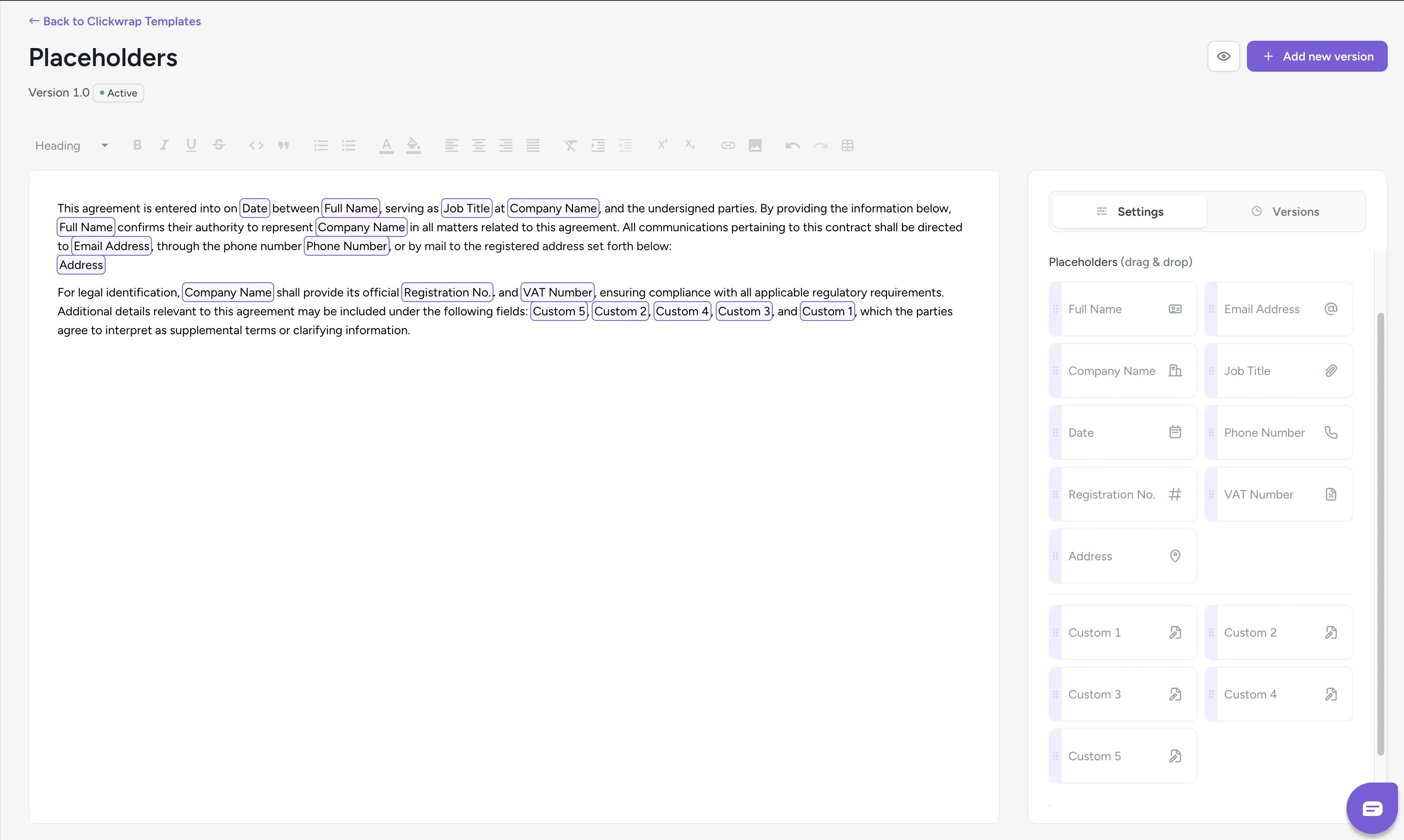
**Prerequisites:** A [published template](/product/getting-started/first-clickwrap) with placeholder tokens configured in the [template editor](/product/templates/placeholders), and the [SDK installed](/dev/sdk/web/installation).
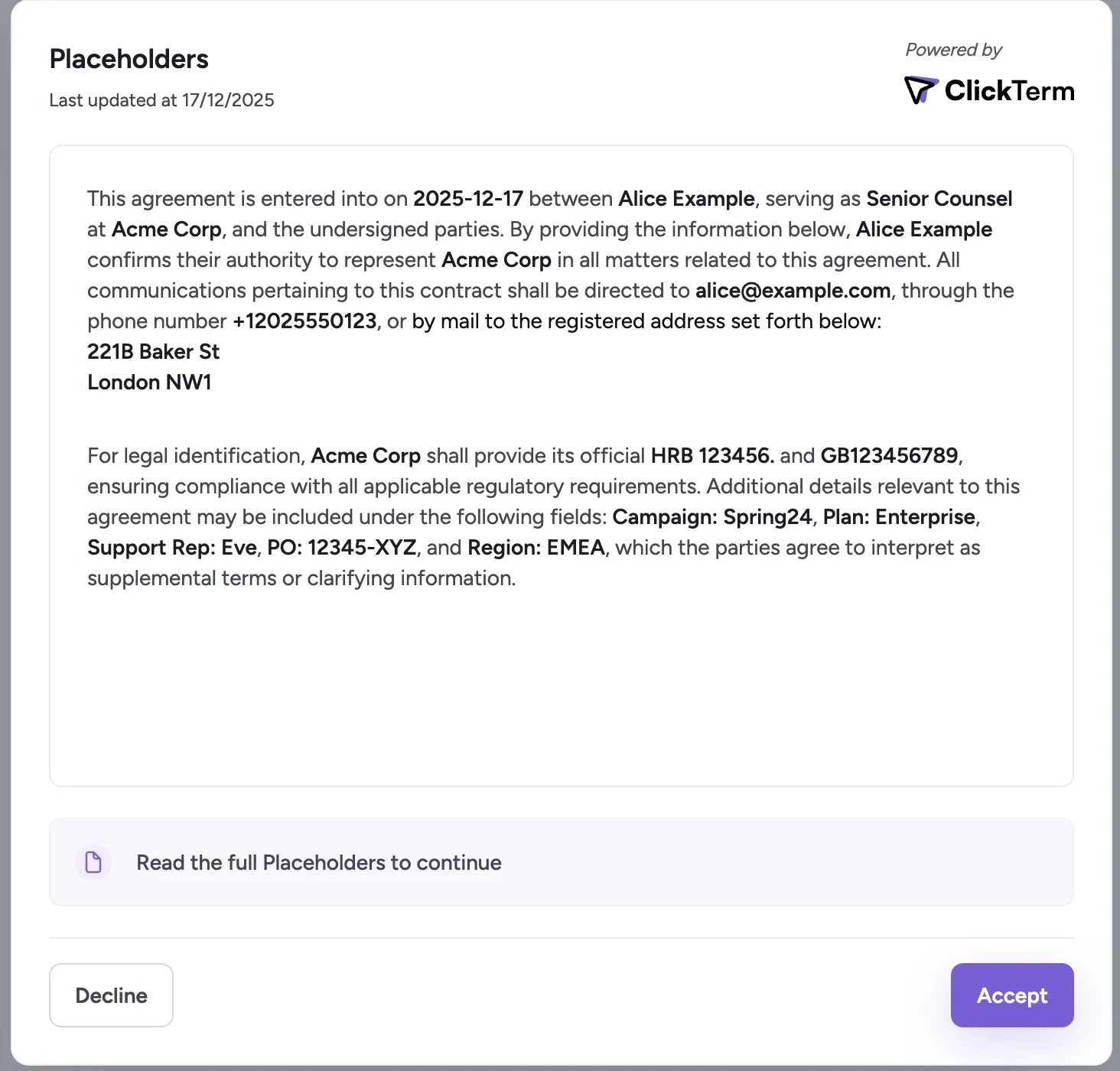
Placeholders inject dynamic, user-specific values into template content without changing the published text. Provide values through your integration whenever a clickwrap flow is triggered.
Starting from Web SDK `2.3.0`, Android SDK `2.2.0`, and React Native SDK `0.3.0`, custom placeholders are passed through `customPlaceholders` instead of flat `custom1` to `custom10` fields. If you are on an older version, see the [older versions](#older-versions) section below.
## Available placeholders
**Full Name** — End user's full name. Max 100 chars. Letters, digits, spaces, basic punctuation.
**Email** — End user's email address. Max 254 chars. Standard email format.
**Company** — Organization name. Max 100 chars. Letters, digits, spaces, basic punctuation.
**Job Title** — End user's role. Max 80 chars. Letters, digits, spaces, basic punctuation.
**Date** — Optional date string rendered into the template.
**Phone** — Contact number. Max 30 chars. Digits, spaces, basic punctuation.
**Registration No.** — Company registration identifier. Max 50 chars. Letters, digits, spaces, basic punctuation.
**VAT Number** — VAT identifier. Max 50 chars. Letters, digits, spaces, basic punctuation.
**Address** — Physical address. Max 500 chars. Letters, digits, spaces, punctuation, newlines.
**Custom placeholders** — User-defined placeholder key-value pairs. Max 10000 chars. Letters, digits, spaces, punctuation, newlines
If a placeholder value is not supplied, it appears as a dash (`-`) in the rendered agreement.
## Usage
Applies to **Web SDK `2.3.0+`**, **Android SDK `2.2.0+`**, and **React Native SDK `0.3.0+`**.
```javascript Web SDK (Dialog) theme={null}
const templatePlaceholders = {
fullName: "Alice Example",
email: "alice@example.com",
company: "Acme Corp",
jobTitle: "Senior Counsel",
date: "2026-06-23",
phoneNumber: "+12025550123",
registrationNumber: "HRB 123456",
vatNumber: "GB123456789",
address: "221B Baker St\nLondon NW1",
customPlaceholders: {
region: "EMEA",
plan: "Enterprise",
purchaseOrder: "12345-XYZ",
},
};
ClicktermDialog.show({
endUserId: "user-123",
clickwrapTemplateId: "YOUR_TEMPLATE_ID",
templatePlaceholders,
language: "en"
}).then((result) => {
console.log("Clickwrap result:", result);
}).catch((error) => {
console.error("Clickwrap error:", error);
});
```
```javascript Web SDK (Inline) theme={null}
const templatePlaceholders = {
fullName: "Alice Example",
email: "alice@example.com",
company: "Acme Corp",
jobTitle: "Senior Counsel",
date: "2026-06-23",
phoneNumber: "+12025550123",
registrationNumber: "HRB 123456",
vatNumber: "GB123456789",
address: "221B Baker St\nLondon NW1",
customPlaceholders: {
region: "EMEA",
plan: "Enterprise",
purchaseOrder: "12345-XYZ",
},
};
const handle = await ClicktermDom.renderInline(
"my-consent",
{
endUserId: "user-123",
clickwrapTemplateId: "YOUR_TEMPLATE_ID",
templatePlaceholders,
language: "en",
}
);
```
```kotlin Android SDK theme={null}
val templatePlaceholders = TemplatePlaceholdersRequestDto(
fullName = "Alice Example",
email = "alice@example.com",
company = "Acme Corp",
jobTitle = "Senior Counsel",
date = "2026-06-23",
phoneNumber = "+12025550123",
registrationNumber = "HRB 123456",
vatNumber = "GB123456789",
address = "221B Baker St\nLondon NW1",
customPlaceholders = mapOf(
"region" to "EMEA",
"plan" to "Enterprise",
"purchaseOrder" to "12345-XYZ",
),
)
val contentRequestBody = ClickwrapTemplate(
"YOUR_TEMPLATE_ID", endUserId, templatePlaceholders, "en"
)
ClicktermDialog.show(this, contentRequestBody, null,
object : ClicktermDialog.OnAgreementResultListener {
override fun onSuccess(clicktermSignature: String?) {
// Handle success
}
override fun onError(message: String) {
// Handle error
}
}
)
```
Applies to **Web SDK \< `2.3.0`**, **Android SDK \< `2.2.0`**, and **React Native SDK \< `0.3.0`**.
In older versions, custom placeholders are passed as flat numbered fields (`custom1` through `custom10`) instead of the `customPlaceholders` map.
```javascript Web SDK (Dialog) theme={null}
const templatePlaceholders = {
fullName: "Alice Example",
email: "alice@example.com",
company: "Acme Corp",
jobTitle: "Senior Counsel",
date: "2026-06-23",
phoneNumber: "+12025550123",
registrationNumber: "HRB 123456",
vatNumber: "GB123456789",
address: "221B Baker St\nLondon NW1",
custom1: "EMEA",
custom2: "Enterprise",
custom3: "12345-XYZ",
};
ClicktermDialog.show({
endUserId: "user-123",
clickwrapTemplateId: "YOUR_TEMPLATE_ID",
templatePlaceholders,
language: "en"
}).then((result) => {
console.log("Clickwrap result:", result);
}).catch((error) => {
console.error("Clickwrap error:", error);
});
```
```javascript Web SDK (Inline) theme={null}
const templatePlaceholders = {
fullName: "Alice Example",
email: "alice@example.com",
company: "Acme Corp",
jobTitle: "Senior Counsel",
date: "2026-06-23",
phoneNumber: "+12025550123",
registrationNumber: "HRB 123456",
vatNumber: "GB123456789",
address: "221B Baker St\nLondon NW1",
custom1: "EMEA",
custom2: "Enterprise",
custom3: "12345-XYZ",
};
const handle = await ClicktermDom.renderInline(
"my-consent",
{
endUserId: "user-123",
clickwrapTemplateId: "YOUR_TEMPLATE_ID",
templatePlaceholders,
language: "en",
}
);
```
```kotlin Android SDK theme={null}
val templatePlaceholders = TemplatePlaceholdersRequestDto(
fullName = "Alice Example",
email = "alice@example.com",
company = "Acme Corp",
jobTitle = "Senior Counsel",
date = "2026-06-23",
phoneNumber = "+12025550123",
registrationNumber = "HRB 123456",
vatNumber = "GB123456789",
address = "221B Baker St\nLondon NW1",
custom1 = "EMEA",
custom2 = "Enterprise",
custom3 = "12345-XYZ",
)
val contentRequestBody = ClickwrapTemplate(
"YOUR_TEMPLATE_ID", endUserId, templatePlaceholders, "en"
)
ClicktermDialog.show(this, contentRequestBody, null,
object : ClicktermDialog.OnAgreementResultListener {
override fun onSuccess(clicktermSignature: String?) {
// Handle success
}
override fun onError(message: String) {
// Handle error
}
}
)
```
The `custom1`-`custom10` fields are deprecated and limited to 10 values with generic keys. Upgrade to the latest SDK version to use the `customPlaceholders` map instead.
## How it works
1. You configure placeholder tokens in the template editor (drag and drop from the sidebar)
2. When calling `ClicktermDialog.show()` or `ClicktermDom.renderInline()`, pass values via the `templatePlaceholders` parameter
3. ClickTerm substitutes those values into the template before rendering
4. The same values appear in the Clickwrap Event, Certificate of Acceptance, and end user record
 ## Related
How to configure placeholder tokens in the dashboard editor.
Full guide on showing the clickwrap dialog.
## Related
How to configure placeholder tokens in the dashboard editor.
Full guide on showing the clickwrap dialog.