> ## Documentation Index
> Fetch the complete documentation index at: https://docs.clickterm.com/llms.txt
> Use this file to discover all available pages before exploring further.
# Displaying an inline clickwrap
> Embed a clickwrap consent checkbox directly in your page using the ClickTerm SDK.
**Prerequisites:** [SDK v2.2.0+](/dev/sdk/web/installation) installed, a [published template](/product/getting-started/first-clickwrap) with an effective version, and your [App ID](/product/integrations/integrations-overview).
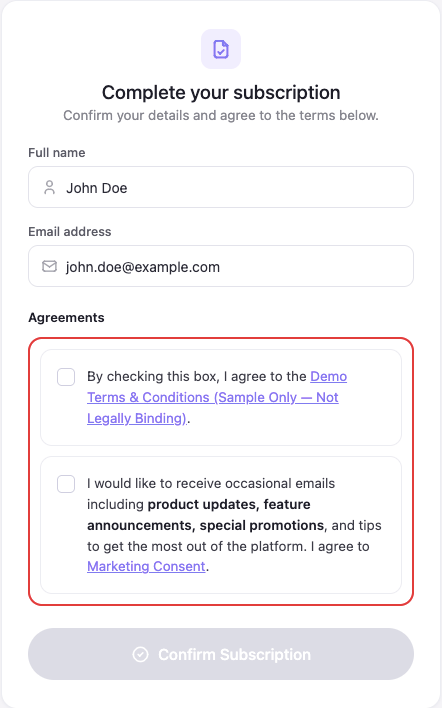
Use `ClicktermDom.renderInline()` to embed a clickwrap agreement as a checkbox directly in your page. Unlike [dialog mode](/dev/guides/displaying-dialog-clickwrap) (which shows a modal overlay), inline mode gives you full control over where the checkbox appears and when the agreement is submitted.
 ## Viewing the full agreement
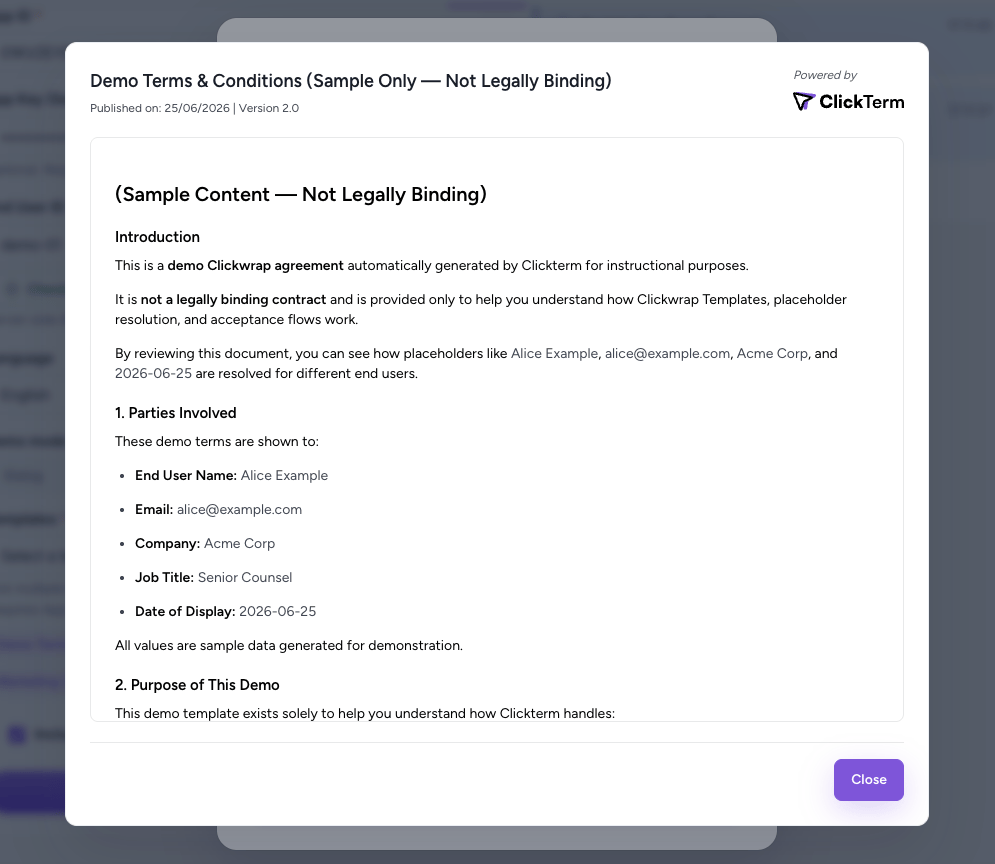
The checkbox text includes a link to the agreement (for example, the template name or "Terms & Conditions"). When the end user clicks that link, the SDK opens a read-only dialog showing the full clickwrap content — without leaving your page or affecting the checkbox state. The user closes the dialog to return to your form.
## Viewing the full agreement
The checkbox text includes a link to the agreement (for example, the template name or "Terms & Conditions"). When the end user clicks that link, the SDK opens a read-only dialog showing the full clickwrap content — without leaving your page or affecting the checkbox state. The user closes the dialog to return to your form.
 ## Basic usage
```html theme={null}
```
```javascript theme={null}
const { ClicktermClient, ClicktermDom } = window.Clickterm;
ClicktermClient.initialize('YOUR_CLICKTERM_APP_ID');
const handle = await ClicktermDom.renderInline(
'my-consent',
{
endUserId: 'user-123',
clickwrapTemplateId: 'YOUR_TEMPLATE_ID',
}
);
// Finalize when the user submits your form
document.getElementById('my-form').addEventListener('submit', async (e) => {
e.preventDefault();
const result = await handle.finalize();
console.log('Status:', result.status);
console.log('Signature:', result.clicktermSignature);
// Send result.clicktermSignature to your backend for verification
});
```
## Step-by-step
Add an empty element with a unique `id` where the checkbox should appear:
```html theme={null}
```
The container must exist in the DOM when `renderInline()` is called and must not already have another inline clickwrap rendered in it. Each container holds one inline clickwrap at a time — to render into a container that already has one (for example, to re-render with different parameters), first call `handle.destroy()` on its handle to tear down the existing instance, otherwise `renderInline()` throws an "already rendered for container" error. After `destroy()`, the container is free to be reused.
Call `ClicktermDom.renderInline()` with the container ID, request parameters, and optional callbacks:
```javascript theme={null}
const handle = await ClicktermDom.renderInline(
'consent-checkbox',
{
endUserId: 'user-123',
clickwrapTemplateId: 'YOUR_TEMPLATE_ID',
language: 'en',
templatePlaceholders: { fullName: 'Alice Johnson' },
},
{
onChange: (checked) => {
document.getElementById('submit-btn').disabled = !checked;
},
}
);
```
The SDK fetches the agreement content, renders a checkbox + text inside a Shadow DOM in your container, and returns a handle.
The `onChange` callback fires every time the checkbox state changes. Use it to enable or disable your submit button:
```javascript theme={null}
onChange: (checked) => {
submitButton.disabled = !checked;
}
```
When the user submits your form, call `finalize()` on the handle. This locks the checkbox, reads its state, and sends the confirmation to ClickTerm:
```javascript theme={null}
const result = await handle.finalize();
if (result.status === 'ERROR') {
console.error('Failed:', result.error?.message);
// Checkbox is automatically unlocked for retry
} else {
// Send result.clicktermSignature to your backend
}
```
Send the Signature to your server and call the ClickTerm verification endpoint. This step is the same as dialog mode — see [Verifying a Signature](/dev/guides/verifying-signature) for full details.
## Parameters
| Parameter | Type | Required | Description |
| ---------------------- | -------- | -------- | -------------------------------------------------------------------------------------------------------- |
| `containerId` | `string` | Yes | The `id` of the HTML element to render into |
| `endUserId` | `string` | Yes | Your identifier for the end user (max 256 chars) |
| `clickwrapTemplateId` | `string` | Yes | Template ID from the [ClickTerm dashboard](https://app.clickterm.com/templates) |
| `language` | `string` | No | Language code (e.g., `"en"`, `"de"`). See [supported languages](/product/reference/supported-languages) |
| `templatePlaceholders` | `object` | No | Structured [placeholder](/dev/guides/placeholders) object with standard fields plus `customPlaceholders` |
### Options
| Field | Type | Description |
| ----------- | ---------------------------- | --------------------------------------------------------------------------------------------------------- |
| `onChange` | `(checked: boolean) => void` | Called every time the checkbox state changes |
| `onLoading` | `(info) => void` | Called before the agreement is requested — show your loader |
| `onReady` | `(info) => void` | Called once the agreement is ready, whichever outcome applies |
| `onError` | `(error, info) => void` | Called when rendering fails |
| `style` | `object` | Visual customization — see [ClicktermDom styling reference](/dev/sdk/web/clickterm-dom#styling-reference) |
`onLoading`, `onReady`, and `onError` were added in Web SDK `2.5.0`. Use them to
reserve space and show a loader so your form does not jump when the agreement
appears. See [inline lifecycle callbacks](/dev/sdk/web/clickterm-dom#inline-lifecycle-callbacks)
for the payloads and outcome values.
## Result format
The `finalize()` method returns a `ClicktermInlineFinalizeResult`:
| Field | Type | Description |
| -------------------- | ---------------- | ------------------------------------------------------------------------------------------------------------------------ |
| `status` | `string` | `UNVERIFIED` — verify the Signature server-side. `ALREADY_ACCEPTED` — user already accepted. `ERROR` — submission failed |
| `clicktermSignature` | `string \| null` | The Signature to send to your backend for [verification](/dev/guides/verifying-signature). `null` if not available |
| `submittedStatus` | `string` | What was sent: `ACCEPTED` (checked) or `DECLINED` (unchecked) |
| `error` | `Error` | Present only when `status` is `ERROR` |
```json User accepts (checkbox checked) theme={null}
{
"status": "UNVERIFIED",
"clicktermSignature": "eyJhbGciOiJSUzI1NiJ9...",
"submittedStatus": "ACCEPTED"
}
```
```json User declines (checkbox unchecked) theme={null}
{
"status": "UNVERIFIED",
"clicktermSignature": "eyJhbGciOiJSUzI1NiJ9...",
"submittedStatus": "DECLINED"
}
```
```json User already accepted previously theme={null}
{
"status": "ALREADY_ACCEPTED",
"clicktermSignature": null
}
```
```json Submission error theme={null}
{
"status": "ERROR",
"clicktermSignature": null,
"error": { "message": "Network error" }
}
```
Requests to render an inline clickwrap are **not counted toward billing**. Only
the [verification step](/dev/guides/verifying-signature) (`POST /clickwrap/verify`) is billed.
## Handle types
Depending on the backend response, `renderInline()` may return different handle types:
### Normal case
The user has not accepted yet. A checkbox and agreement text are rendered in the container.
```javascript theme={null}
const handle = await ClicktermDom.renderInline('container', request);
handle.isChecked(); // false (initially unchecked)
handle.getCurrentResult(); // null (not yet finalized)
```
### Already accepted
The user already accepted this template in a previous session. **No UI is rendered** in the container.
```javascript theme={null}
const handle = await ClicktermDom.renderInline('container', request);
handle.isChecked(); // true (always)
handle.getCurrentResult(); // { status: 'ALREADY_ACCEPTED', clicktermSignature: null }
```
### Existing signature
The backend has a signature from a different flow. **No UI is rendered** in the container.
```javascript theme={null}
const handle = await ClicktermDom.renderInline('container', request);
handle.isChecked(); // false
handle.getCurrentResult(); // { status: 'UNVERIFIED', clicktermSignature: '...' }
```
### Handling all cases
```javascript theme={null}
const handle = await ClicktermDom.renderInline('container', request);
const initialResult = handle.getCurrentResult();
if (initialResult?.status === 'ALREADY_ACCEPTED') {
// User already accepted — no checkbox shown, proceed with your flow
} else if (initialResult?.status === 'UNVERIFIED' && initialResult?.clicktermSignature) {
// Existing signature — verify it server-side
} else {
// Normal case — checkbox rendered, wait for user interaction
}
```
## Multiple inline clickwraps
You can render multiple independent inline clickwraps on the same page. Each needs its own container and `renderInline()` call.
```html theme={null}
```
```javascript theme={null}
const tosHandle = await ClicktermDom.renderInline('consent-tos', {
endUserId: 'user-123',
clickwrapTemplateId: 'TEMPLATE_TOS',
});
const privacyHandle = await ClicktermDom.renderInline('consent-privacy', {
endUserId: 'user-123',
clickwrapTemplateId: 'TEMPLATE_PRIVACY',
});
```
### Finalizing all at once
Instead of calling `finalize()` on each handle, use `finalizeAll()`:
```javascript theme={null}
const results = await ClicktermDom.finalizeAll();
// Or finalize specific ones
const results = await ClicktermDom.finalizeAll(['consent-tos', 'consent-privacy']);
// Check results
for (const [containerId, result] of Object.entries(results)) {
if (result.status === 'ERROR') {
console.error(`Failed for ${containerId}:`, result.error?.message);
} else {
console.log(`${containerId} signature:`, result.clicktermSignature);
}
}
```
## Error handling
Wrap `renderInline()` in try/catch. All errors are instances of `ClickwrapError`:
```javascript theme={null}
try {
const handle = await ClicktermDom.renderInline('container', request, options);
} catch (error) {
console.error('Failed to render:', error.message);
}
```
| Error | Cause | Fix |
| ------------------------------ | ---------------------------------------------------------- | ------------------------------------------------------------------- |
| Container element not found | No element with that ID in the DOM | Ensure the element exists before calling `renderInline()` |
| Already rendered for container | `renderInline()` called twice for the same container | Call `handle.destroy()` first, or use a different container |
| Missing inline content | Backend returned content without the `inlineContent` field | Check your template configuration — make sure inline content is set |
| Client not initialized | `ClicktermClient.initialize()` was not called | Call `initialize()` before any render calls |
Finalize errors do **not** throw. They return a result with `status: 'ERROR'` and the checkbox is automatically unlocked for retry.
## Full working example
A registration form with two inline clickwraps:
```html theme={null}
```
## Next steps
Verify the user's action on your backend.
Full API reference, styling options, and type definitions.
Pass dynamic data into the agreement text.
Use the modal dialog approach instead.
Re-display an agreement the user already accepted.
## Basic usage
```html theme={null}
```
```javascript theme={null}
const { ClicktermClient, ClicktermDom } = window.Clickterm;
ClicktermClient.initialize('YOUR_CLICKTERM_APP_ID');
const handle = await ClicktermDom.renderInline(
'my-consent',
{
endUserId: 'user-123',
clickwrapTemplateId: 'YOUR_TEMPLATE_ID',
}
);
// Finalize when the user submits your form
document.getElementById('my-form').addEventListener('submit', async (e) => {
e.preventDefault();
const result = await handle.finalize();
console.log('Status:', result.status);
console.log('Signature:', result.clicktermSignature);
// Send result.clicktermSignature to your backend for verification
});
```
## Step-by-step
Add an empty element with a unique `id` where the checkbox should appear:
```html theme={null}
```
The container must exist in the DOM when `renderInline()` is called and must not already have another inline clickwrap rendered in it. Each container holds one inline clickwrap at a time — to render into a container that already has one (for example, to re-render with different parameters), first call `handle.destroy()` on its handle to tear down the existing instance, otherwise `renderInline()` throws an "already rendered for container" error. After `destroy()`, the container is free to be reused.
Call `ClicktermDom.renderInline()` with the container ID, request parameters, and optional callbacks:
```javascript theme={null}
const handle = await ClicktermDom.renderInline(
'consent-checkbox',
{
endUserId: 'user-123',
clickwrapTemplateId: 'YOUR_TEMPLATE_ID',
language: 'en',
templatePlaceholders: { fullName: 'Alice Johnson' },
},
{
onChange: (checked) => {
document.getElementById('submit-btn').disabled = !checked;
},
}
);
```
The SDK fetches the agreement content, renders a checkbox + text inside a Shadow DOM in your container, and returns a handle.
The `onChange` callback fires every time the checkbox state changes. Use it to enable or disable your submit button:
```javascript theme={null}
onChange: (checked) => {
submitButton.disabled = !checked;
}
```
When the user submits your form, call `finalize()` on the handle. This locks the checkbox, reads its state, and sends the confirmation to ClickTerm:
```javascript theme={null}
const result = await handle.finalize();
if (result.status === 'ERROR') {
console.error('Failed:', result.error?.message);
// Checkbox is automatically unlocked for retry
} else {
// Send result.clicktermSignature to your backend
}
```
Send the Signature to your server and call the ClickTerm verification endpoint. This step is the same as dialog mode — see [Verifying a Signature](/dev/guides/verifying-signature) for full details.
## Parameters
| Parameter | Type | Required | Description |
| ---------------------- | -------- | -------- | -------------------------------------------------------------------------------------------------------- |
| `containerId` | `string` | Yes | The `id` of the HTML element to render into |
| `endUserId` | `string` | Yes | Your identifier for the end user (max 256 chars) |
| `clickwrapTemplateId` | `string` | Yes | Template ID from the [ClickTerm dashboard](https://app.clickterm.com/templates) |
| `language` | `string` | No | Language code (e.g., `"en"`, `"de"`). See [supported languages](/product/reference/supported-languages) |
| `templatePlaceholders` | `object` | No | Structured [placeholder](/dev/guides/placeholders) object with standard fields plus `customPlaceholders` |
### Options
| Field | Type | Description |
| ----------- | ---------------------------- | --------------------------------------------------------------------------------------------------------- |
| `onChange` | `(checked: boolean) => void` | Called every time the checkbox state changes |
| `onLoading` | `(info) => void` | Called before the agreement is requested — show your loader |
| `onReady` | `(info) => void` | Called once the agreement is ready, whichever outcome applies |
| `onError` | `(error, info) => void` | Called when rendering fails |
| `style` | `object` | Visual customization — see [ClicktermDom styling reference](/dev/sdk/web/clickterm-dom#styling-reference) |
`onLoading`, `onReady`, and `onError` were added in Web SDK `2.5.0`. Use them to
reserve space and show a loader so your form does not jump when the agreement
appears. See [inline lifecycle callbacks](/dev/sdk/web/clickterm-dom#inline-lifecycle-callbacks)
for the payloads and outcome values.
## Result format
The `finalize()` method returns a `ClicktermInlineFinalizeResult`:
| Field | Type | Description |
| -------------------- | ---------------- | ------------------------------------------------------------------------------------------------------------------------ |
| `status` | `string` | `UNVERIFIED` — verify the Signature server-side. `ALREADY_ACCEPTED` — user already accepted. `ERROR` — submission failed |
| `clicktermSignature` | `string \| null` | The Signature to send to your backend for [verification](/dev/guides/verifying-signature). `null` if not available |
| `submittedStatus` | `string` | What was sent: `ACCEPTED` (checked) or `DECLINED` (unchecked) |
| `error` | `Error` | Present only when `status` is `ERROR` |
```json User accepts (checkbox checked) theme={null}
{
"status": "UNVERIFIED",
"clicktermSignature": "eyJhbGciOiJSUzI1NiJ9...",
"submittedStatus": "ACCEPTED"
}
```
```json User declines (checkbox unchecked) theme={null}
{
"status": "UNVERIFIED",
"clicktermSignature": "eyJhbGciOiJSUzI1NiJ9...",
"submittedStatus": "DECLINED"
}
```
```json User already accepted previously theme={null}
{
"status": "ALREADY_ACCEPTED",
"clicktermSignature": null
}
```
```json Submission error theme={null}
{
"status": "ERROR",
"clicktermSignature": null,
"error": { "message": "Network error" }
}
```
Requests to render an inline clickwrap are **not counted toward billing**. Only
the [verification step](/dev/guides/verifying-signature) (`POST /clickwrap/verify`) is billed.
## Handle types
Depending on the backend response, `renderInline()` may return different handle types:
### Normal case
The user has not accepted yet. A checkbox and agreement text are rendered in the container.
```javascript theme={null}
const handle = await ClicktermDom.renderInline('container', request);
handle.isChecked(); // false (initially unchecked)
handle.getCurrentResult(); // null (not yet finalized)
```
### Already accepted
The user already accepted this template in a previous session. **No UI is rendered** in the container.
```javascript theme={null}
const handle = await ClicktermDom.renderInline('container', request);
handle.isChecked(); // true (always)
handle.getCurrentResult(); // { status: 'ALREADY_ACCEPTED', clicktermSignature: null }
```
### Existing signature
The backend has a signature from a different flow. **No UI is rendered** in the container.
```javascript theme={null}
const handle = await ClicktermDom.renderInline('container', request);
handle.isChecked(); // false
handle.getCurrentResult(); // { status: 'UNVERIFIED', clicktermSignature: '...' }
```
### Handling all cases
```javascript theme={null}
const handle = await ClicktermDom.renderInline('container', request);
const initialResult = handle.getCurrentResult();
if (initialResult?.status === 'ALREADY_ACCEPTED') {
// User already accepted — no checkbox shown, proceed with your flow
} else if (initialResult?.status === 'UNVERIFIED' && initialResult?.clicktermSignature) {
// Existing signature — verify it server-side
} else {
// Normal case — checkbox rendered, wait for user interaction
}
```
## Multiple inline clickwraps
You can render multiple independent inline clickwraps on the same page. Each needs its own container and `renderInline()` call.
```html theme={null}
```
```javascript theme={null}
const tosHandle = await ClicktermDom.renderInline('consent-tos', {
endUserId: 'user-123',
clickwrapTemplateId: 'TEMPLATE_TOS',
});
const privacyHandle = await ClicktermDom.renderInline('consent-privacy', {
endUserId: 'user-123',
clickwrapTemplateId: 'TEMPLATE_PRIVACY',
});
```
### Finalizing all at once
Instead of calling `finalize()` on each handle, use `finalizeAll()`:
```javascript theme={null}
const results = await ClicktermDom.finalizeAll();
// Or finalize specific ones
const results = await ClicktermDom.finalizeAll(['consent-tos', 'consent-privacy']);
// Check results
for (const [containerId, result] of Object.entries(results)) {
if (result.status === 'ERROR') {
console.error(`Failed for ${containerId}:`, result.error?.message);
} else {
console.log(`${containerId} signature:`, result.clicktermSignature);
}
}
```
## Error handling
Wrap `renderInline()` in try/catch. All errors are instances of `ClickwrapError`:
```javascript theme={null}
try {
const handle = await ClicktermDom.renderInline('container', request, options);
} catch (error) {
console.error('Failed to render:', error.message);
}
```
| Error | Cause | Fix |
| ------------------------------ | ---------------------------------------------------------- | ------------------------------------------------------------------- |
| Container element not found | No element with that ID in the DOM | Ensure the element exists before calling `renderInline()` |
| Already rendered for container | `renderInline()` called twice for the same container | Call `handle.destroy()` first, or use a different container |
| Missing inline content | Backend returned content without the `inlineContent` field | Check your template configuration — make sure inline content is set |
| Client not initialized | `ClicktermClient.initialize()` was not called | Call `initialize()` before any render calls |
Finalize errors do **not** throw. They return a result with `status: 'ERROR'` and the checkbox is automatically unlocked for retry.
## Full working example
A registration form with two inline clickwraps:
```html theme={null}
```
## Next steps
Verify the user's action on your backend.
Full API reference, styling options, and type definitions.
Pass dynamic data into the agreement text.
Use the modal dialog approach instead.
Re-display an agreement the user already accepted.